Hackathon
Gradly
A research paper becomes a series of decisions: make a claim, explain your thinking, then see what the evidence supports.
Learn to question.
Grow with evidence.
A book, a graduation cap, and a guide through the decisions that make research worth reading.

- Students learning to read research critically
- Frontend Developer
- October 2026
The product in motion
From paper to practice
The team’s demo follows the real application through upload, AI preparation, research decisions and the paper reveal. I created the film with Remotion, using React to compose the recorded interface, scenes and timing.
The situation
Being told to read the literature does not teach you how to judge it. A summary can tell you what a paper says while skipping the harder questions: what can this design establish, which explanation fits, and where does the evidence stop?
What we built
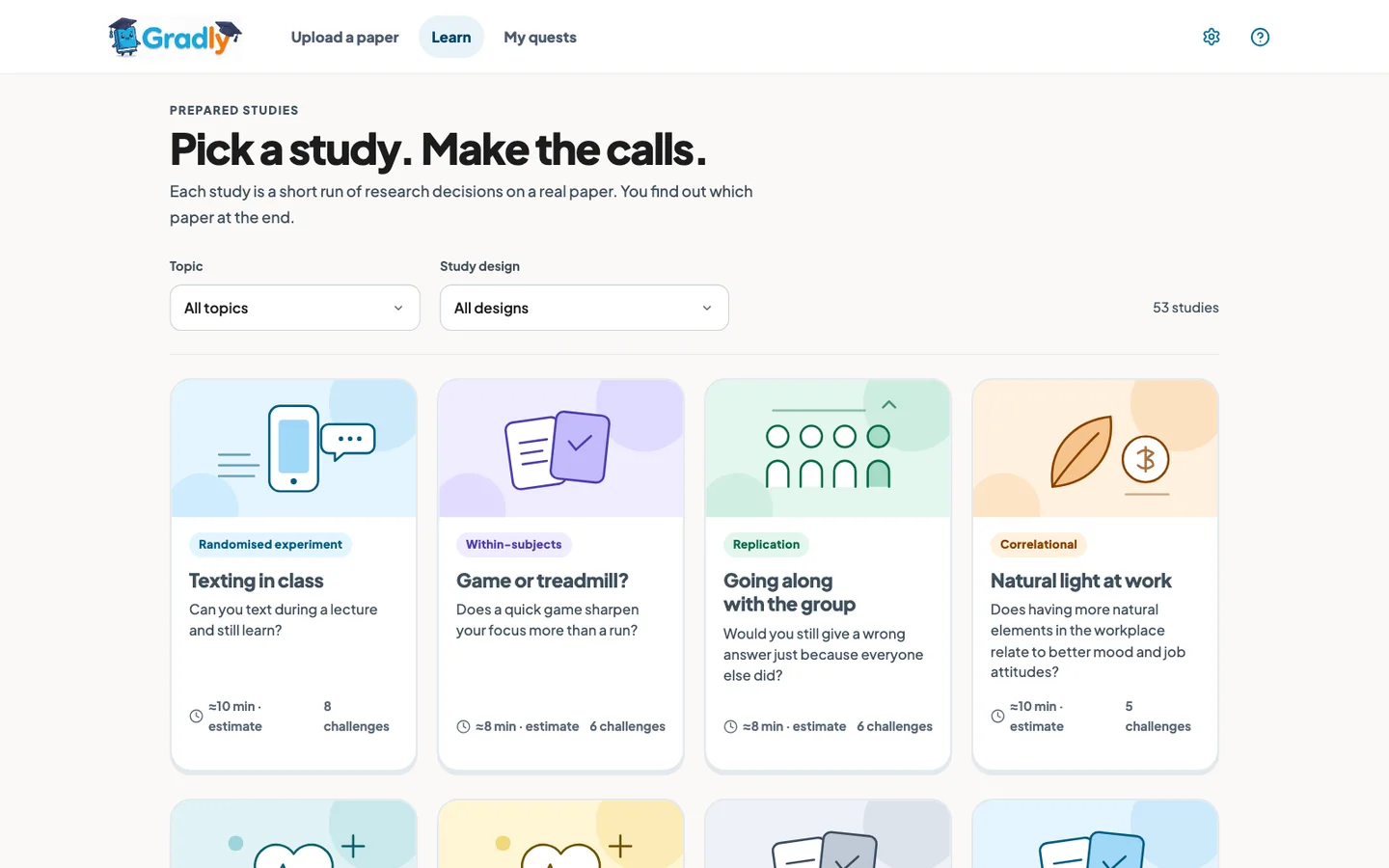
We built Gradly around those decisions. A learner uploads a paper or opens one of 53 prepared studies, reads a short briefing and works through evidence-linked challenges. Visual comparisons, hints and explanations help them reason about the study before its findings and identity are revealed.
For uploaded papers, the server extracts the text, offers it for review and asks for consent before AI preparation. Six role-based stages use NVIDIA Nemotron 3 Super through Nebius Token Factory; a seventh stage checks quotes and references in code. Uploaded lessons keep answer keys on the server, while the prepared library uses authored content.
My first hackathon: the Nebius x NVIDIA Global AI Hackathon. We built and submitted Gradly as a six-person team in October 2026. I worked on the front end, learner experience, source review and motion, and created our demo film with Remotion. Development concluded with submission.
What it lets people do
- 01Inspect extracted PDF text beside the original before consenting to live AI processing, including bounded English OCR for scanned pages.
- 02Practise with a prepared study or work through three to eight challenges generated from an uploaded paper.
- 03Compare claims, sort ideas and inspect designs through interactive scenes tied to the paper’s evidence.
- 04Explain a choice, receive evidence-bounded AI feedback and use one hint-led retry before seeing the explanation.
- 05Resume saved work, earn practice points once per solved challenge and delete uploaded studies and their sessions.
Who built it
Built by 6 people.
- Marc Ocampo on GitHub (opens in a new tab)
- John Christian Diamante on GitHub (opens in a new tab)
- Jake Manahan on GitHub (opens in a new tab)
- Jan Nielsen Añonuevo on GitHub (opens in a new tab)
- Celestine Joy Rosales on LinkedIn (opens in a new tab)
- Angelo Sebaxtian Vasquez on LinkedIn (opens in a new tab)
My part in a shared build
Making research decisions usable
My role was frontend development, with work on the learner experience, study content, visuals, motion and demo film. These links show the interface and learning work accepted into the shared repository, within a six-person team.
The upload-to-learning interface
I worked on the upload-first front end: adding a paper, reviewing extracted text, following preparation, recovering from errors and entering a study. The interface stayed connected to the team’s existing document-processing and learning services, with clear sample and resume paths. The backend implementation was outside my role.
Learning through decisions
I developed the authored texting quest and a three-paper activity pilot, refined motion and phone layouts, added briefing orientation and improved navigation and recovery. The shared player later replaced the bespoke quest; the early work informed the learning experience rather than remaining a second product flow.
Questions worth reasoning about
Across two revision batches, I revised 47 prepared studies containing 274 required questions against their source papers. I replaced recall prompts with research decisions, corrected interpretations, aligned hints and definitions, and reduced shortcuts from answer position and length. Revised question versions also prevent old saved answers from scoring against new wording. This was a source-review pass, not independent subject-expert approval.
Visuals that stay faithful to the paper
I added 40 source-backed scenes across 21 studies using the existing scene system, bringing the prepared library to at least one visual per study at that revision. I then corrected misleading comparisons and removed scenes that missed their question.
A consistent interface and a living guide
I unified the Upload, Learn and introduction routes, fixed stale navigation and upload recovery, preserved keyboard focus, and scoped the mascot animation to the upload introduction. A follow-up made its original 4.8-second greeting loop continuously while retaining a static reduced-motion alternative.
Showing the product working
I created the team’s demo film with Remotion, composing recorded interface footage, scenes and timing in React. I added its video workspace to the repository and documented the Token Factory workflow and published walkthrough, showing the real preparation stages and learning journey.
A decision, then its evidence
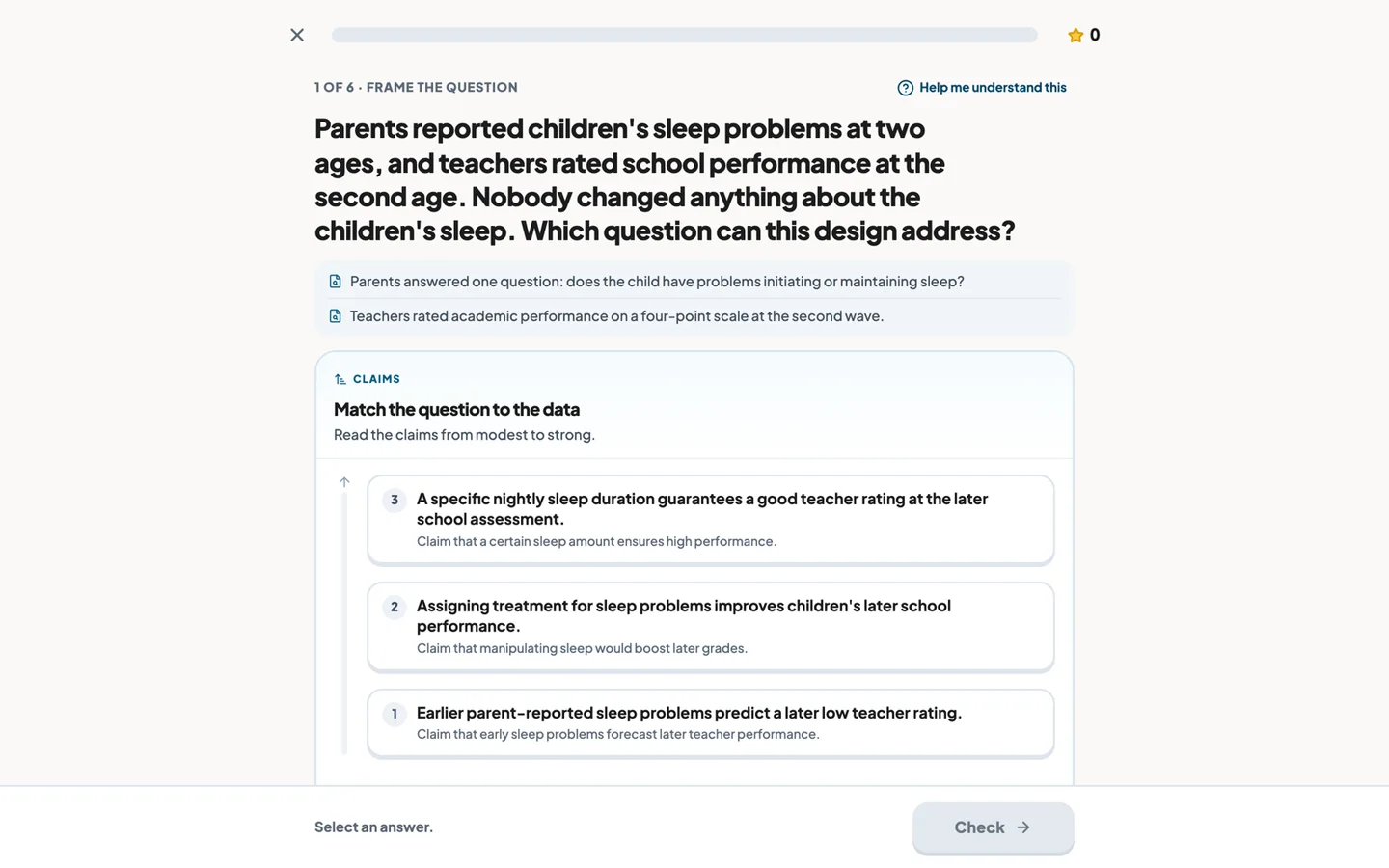
The prepared library gives people a way in without an upload. Inside a study, the task is to decide which question or claim the design can support. The scene is there to make the reasoning inspectable. Screens below come from the team’s repository; open an image to read it at full size.
Open full size (opens in a new tab)
Open full size (opens in a new tab)
Inside an uploaded study
Six AI roles. A final check in code.
After extraction, review and consent, preparation runs as a saved sequence. Each role has a separate prompt to the same Nemotron model. The final stage verifies the quoted evidence without asking a model to judge its own accuracy.
- 01
Evidence analyst
Extracts exact passages about the question, design, findings and limits, and records what the paper does not report.
- 02
Lesson architect
Turns those passages into three to eight research decisions, with hints, explanations and a spoiler-free briefing.
- 03
Scene designer
Builds an interactive scene from the question and evidence without receiving its answer key. Unsafe scenes fall back to an evidence view.
- 04
Terms guide
Defines unfamiliar terms in the context of this study. Definitions that disclose an answer are removed.
- 05
Methods reviewer
Checks methodological claims and flags interpretations that go beyond the evidence.
- 06
Learning coach
Checks clarity and teaching quality. These model reviews advise the pipeline; they do not certify a lesson.
- 07
Verification in code
Checks quoted text against extracted pages, validates references and blocks a lesson when the deterministic checks fail.
Interface
React 19, TypeScript and Vite, with Motion for transitions and thirteen scene types for comparing, sorting and inspecting evidence.
API and learning state
Node.js and Express, shared lesson contracts and a learning-state package. Uploaded lessons are scored on the server; prepared studies use authored local content.
Documents and storage
pdf-parse extracts text; Tesseract.js handles bounded English OCR. SQLite supports local use and remote libSQL supports hosted storage, with signed guest cookies, deletion and 30-day expiry.
AI and deployment
NVIDIA Nemotron 3 Super runs through Nebius Token Factory’s OpenAI-compatible API. JSON Schema and Zod validate structured replies. Vercel hosts the interface and API; Remotion powers the demo film.
The team’s 240-run model evaluation cost $4.35 and informed the move to Nemotron 3 Super. It also exposed weaker exact quoting on longer inputs—a reason to verify passages in code, rather than assume that a more capable model will cite them faithfully.
Read the team’s model evaluation (opens in a new tab)What is still unproven
- The hackathon AI credits have run out, so generating lessons from uploaded papers is unavailable. You can still try the prepared sample studies without AI credits, or watch the recorded demo below.
- Gradly has not been tested in a learner study. Practice points record participation, and no improvement in learning or research literacy is claimed.
- Exact quote matching catches text and reference errors; it cannot establish that an interpretation is correct. Model reviewers are advisory, and prepared content still needs subject-expert review.
- PDF extraction is limited to 80 pages and English OCR to six low-text pages. Original PDFs are not stored. Learners review extracted text and consent before live AI preparation.
- Arbitrary paper links are not fetched. The local no-key sample mode is explicitly separate from live generation and never substitutes silently for a failed model request.
Under the hood
The tools this is built with. You do not need to know any of them to use it — open one if you are curious what it does.